
★ GTA 4 DOWNGRADER / REDD40 MUSIC ★
REDD40.TECH
GTA IV downgrades, optional mods, and REDD40 music.
CHOOSE YOUR LEGACY VERSION
TRUE PATRIOTGTA 4 DOWNGRADER
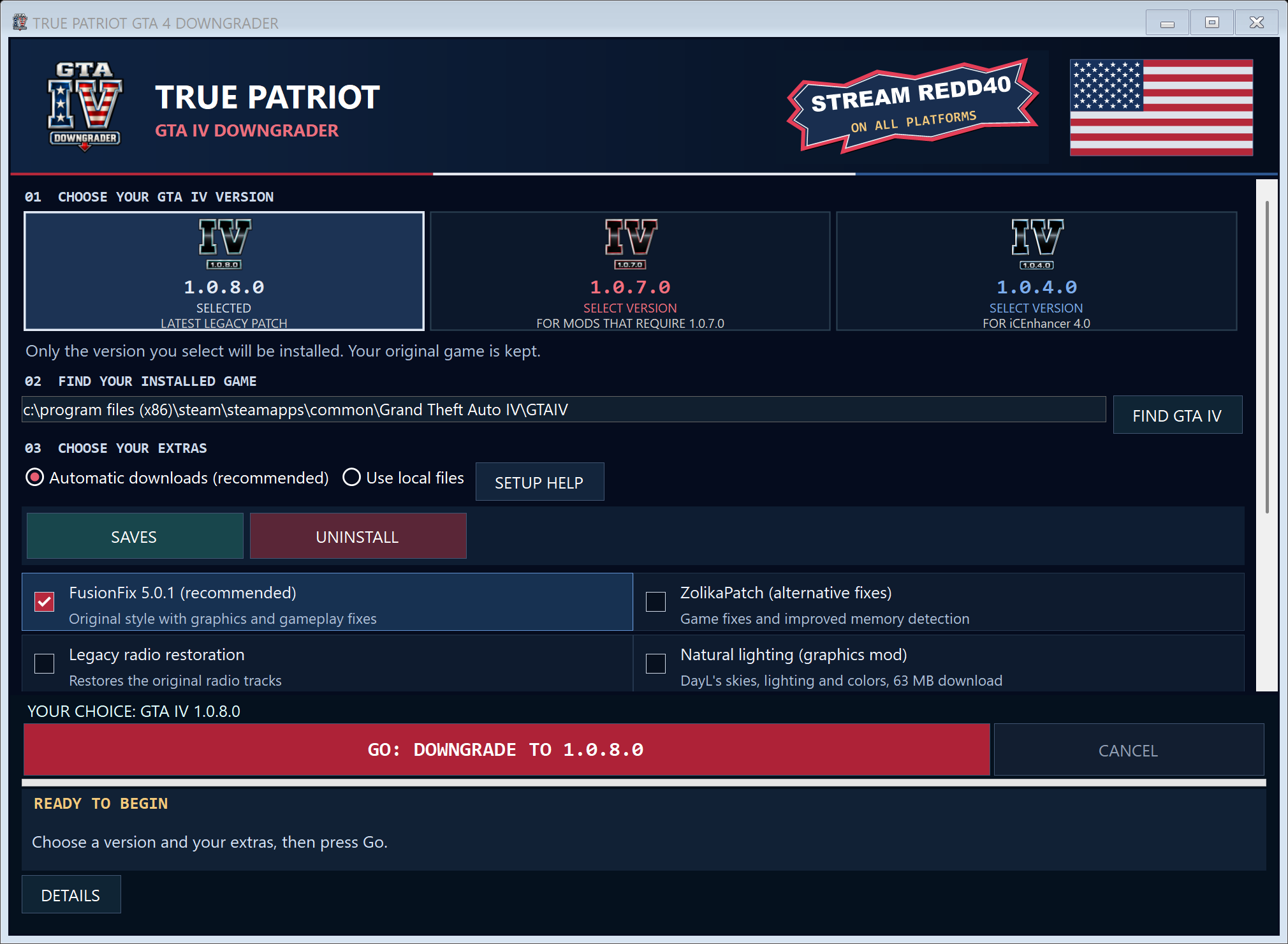
Install GTA IV 1.0.4.0, 1.0.7.0 or 1.0.8.0.
Choose the GTA IV version you want to play and add the mods you want to use. TRUE PATRIOT GTA 4 DOWNGRADER builds a separate game folder, keeping your original Complete Edition installation intact.

- 1.0.4.0Optional iCEnhancer 4.0 graphics
- 1.0.7.0For mods built for 1.0.7.0
- 1.0.8.0Latest legacy version
iCEnhancer 4.0 is an optional graphics upgrade for 1.0.4.0. On 1.0.7.0 and 1.0.8.0, choose FusionFix for corrections to the original look, or add Natural lighting for a different lighting and color style. The app shows the options available for your version.
GTA 4 DOWNGRADERFIRST PUBLIC RELEASE · WINDOWS x64 · 148.06 MB
The first public release is available. Download the app, then open it from your browser’s downloads or your Downloads folder.
Direct Download- VERSION
- First public release
- FILE SIZE
- 148.06 MB (141.21 MiB)
- BUILD DATE
- Not provided
- RELEASE DATE
- FILE
- TRUE.PATRIOT.GTA.4.DOWNGRADER.exe
- SHA-256
8e9b55d627ab2b9bce349ec905ea7a6847deb645d174a44158dbb77199ce495e
HOW TO GET STARTED
- Download, open, and find GTA IV.Open TRUE.PATRIOT.GTA.4.DOWNGRADER.exe from your Downloads folder. Check the game folder it finds. If it is missing or incorrect, select FIND GTA IV and choose your installed GTAIV.exe.
- Choose one version and your mods.Select a game version, then tick the compatible extras you want. Leave Automatic downloads selected, or use your own files with SETUP HELP.
- Press Go and wait for setup.The app copies your game and installs your choices. It tells you before opening a short game test. Leave that test open; setup will close it for you.
- Launch your new game.Wait for YOUR GAME IS READY. Choose PLAY GTA IV or use the new GTA IV Legacy desktop shortcut. To use transferred progress, open Game > Load.
System requirements & compatibility
You need 64-bit Windows 10 or 11 and your own supported GTA IV Complete Edition installation. Leave enough storage for a separate game copy and your selected mods; setup checks the available space. Automatic downloads need an internet connection.
The downgrader is a standalone Windows app with its runtime included. Setup will tell you if the game needs additional prerequisites. Performance depends on your PC and the mods you select.
First public release
Choose one legacy GTA IV version, add compatible mods, and follow the guided setup. Automatic downloads and local-file setup are supported. The first public release is available to download above.
Manual setup & save files
Already have the mod files? Select Use local files, then open SETUP HELP for the packages your chosen game version needs. Use packages for that exact version.
Open SAVES to find, back up or transfer supported story saves. You can search automatically or choose a folder yourself. After a transfer, select Game > Load in GTA IV. Complete Edition saves cannot be converted for legacy versions. Use UNINSTALL to remove a game copy recognized by TRUE PATRIOT GTA 4 DOWNGRADER.
Check your download
Compare the file's SHA-256 with the value above. A matching checksum confirms the file matches this release; it is not a malware or safety certificate.
Windows or your browser may warn about an unfamiliar executable. Review the source and any warnings before running it. Do not disable your security software.
In PowerShell, use Get-FileHash -LiteralPath ".\TRUE.PATRIOT.GTA.4.DOWNGRADER.exe" -Algorithm SHA256.
GTA IV MODPACK
REDD40 GTA IV Liberty Plus Edition
For GTA IV 1.0.8.0 with FusionFix 5.0.1. Supports Niko's campaign.
A larger Liberty City, with expanded interiors, more activities, vehicle customization, and integrated first-person gameplay.
- Expanded content and interiors from TACE, Liberty Alive, and Liberty Unlocked.
- First-person gameplay with an F8 toggle, adapted movement, combat, and vehicle views.
- Liberty City Customs upgrades and vehicle customization.
- Personal vehicle trackers and a Mechanic phone contact for delivery.
- Store robberies, additional activities, populated venues, and expanded weapon and vehicle spawns.
You need your own GTA IV installation and DLC assets. The full game is not included. This installer does not downgrade GTA IV.
Opens MEGA in a new tab. Download the complete REDD40-LIBERTY-MODPACK-1.0.36.zip there, then return here for setup.
Need GTA IV 1.0.8.0? Get True Patriot DowngraderSet up in two stages
1. PREPARE GTA IV
- Open True Patriot GTA4 Downgrader.Select your installed GTA IV folder.
- Choose GTA IV 1.0.8.0.Keep FusionFix 5.0.1 selected and Required game support enabled.
- Choose the recommended extras.Legacy radio restoration, Natural lighting, and HD details are optional but highly recommended.
- Finish and check your game.Complete the downgrade, check that the game launches, then close it before installing Liberty Plus.
2. INSTALL LIBERTY PLUS
- Download and fully extract the ZIP.In Downloads, right-click REDD40-LIBERTY-MODPACK-1.0.36.zip, choose Extract All, then Extract. Wait for extraction to finish.
- Open the extracted modpack folder.Run REDD40 LIBERTY MODPACK INSTALLER.exe. Keep its Contents folder beside it. Do not run the installer from inside the ZIP or move the EXE out on its own.
- Select the prepared game.Choose your GTA IV 1.0.8.0 folder with FusionFix 5.0.1, or use Choose folder if needed.
- Choose your options and install.Click Install modpack. Allow time for unpacking and wait for Finished.
- Play from your desktop.Open GTA IV LIBERTY PLUS EDITION using its desktop shortcut. Start a NEW GAME on your first Liberty Plus installation.
Allow space for the ZIP, extracted package, and separate new game copy. Read START HERE.txt in the extracted package for full controls and save instructions.
Installer options and updates
Phone controls: the optional phone-control setting enables the pack's alternate keyboard bindings. Leave it off to keep your current phone controls.
Remove previous 1.0.8.0 game: unchecked by default. Leave it off to keep both installations. If selected, setup verifies the new copy and preserves saves, settings, and unique files in its backup location before removing the previous installation.
Already using Liberty Plus? Select your current Liberty Plus folder and choose Repair / update to preserve your Liberty Plus saves.
Radio, lighting, and HD options are chosen in the downgrader and retained by the modpack installer. Setup includes bundled mod assets offline; it does not download missing graphics packs.
Compatibility and mod credits
GTA IV 1.0.8.0 with FusionFix 5.0.1 and owned DLC assets is required. Niko's campaign is supported. Other game versions, the Episodes campaigns, and combinations with unrelated mods are not verified.
Vehicle parts and upgrades depend on the model; wheel swaps and body changes are not universal. Robberies work at supported locations. This is not a complete HD city replacement. The optional HD map is not active.
Not every mission or interior has been play-tested. Distant-light flicker, first-person head shadows/mirrors, and some venue interactions have known limitations. See the included setup and compatibility notes before adding other mods.
Read mod credits. This independent fan project is not affiliated with Rockstar Games or Take-Two Interactive.
Release file details
- Public release
- First Release
- Package version
- 1.0.36
- Platform
- Windows
- File
- REDD40-LIBERTY-MODPACK-1.0.36.zip
- Size
- 4.49 GB · 4,489,160,984 bytes
- SHA-256
d333b06cf0b70b1a8618437c51a74dc0abbddca842b6749dfc453ed9c30f2c10
The checksum identifies the original complete release ZIP. Compare it with your downloaded ZIP before extracting; it is not a safety certificate.
In PowerShell in the download folder: Get-FileHash -LiteralPath ".\REDD40-LIBERTY-MODPACK-1.0.36.zip" -Algorithm SHA256.
Download and extraction help
The button opens the complete MEGA sharing link in a new tab. Use MEGA's Download option to save the ZIP. This website does not download or process the ZIP in its own scripts.
After downloading, use Extract All in Windows and open the extracted modpack folder. Keep the installer and Contents together. The EXE alone is not the complete modpack.
Browser and Windows security checks can vary. Review any warnings before opening a download; do not disable security software.
REDD40 SR2 MODPACK
Saints Row 2, fixed and upgraded, installed with one click.
The REDD40 SR2 MODPACK bundles the best Saints Row 2 community mods into one download. The included REDD40 SR2 FIXER app installs everything for you: it finds your game, backs up your original files, installs the mods, sets your screen's resolution and the recommended graphics settings, and puts a Saints Row 2 icon on your desktop.
Version 1.3 · about 1.6 GB · Saints Row 2 for PC (GOG or Steam) required
NEW IN 1.3
- Gentlemen of the Row 1.9.2 – IdolNinja's super mod, working together with all the console DLC
- Every GotR taunt and walk PLUS the original Saints Row 2 ones
- RMB Aim Auto-Bind – right mouse aims with guns, V with melee (on/off in the game: Options → Controls)
- Co-op code, HD desktop icon, one-click update/repair. Saves are never touched.
- Everything is set to the best options automatically.
What's inside
- Juiced Patch 9.3.1 – the big community fix: much better performance, crash fixes, mouse support in menus, Xbox 360 colours, better shadows and lots more.
- Console DLC for PC 1.0.1 – the Xbox 360/PS3-only DLC, now on PC: Ultor Exposed, Corporate Warfare and the Unkut pack (6 new missions, new cars, new clothes).
- HQ Radio mod 2.0 – every radio station in Xbox 360 quality stereo instead of the PC version's low-quality mono.
- REDD40 SR2 FIXER – the one-click installer, settings app and undo button.
How to install
- Right-click the zip → Extract All → Extract.
- Open the REDD40 SR2 MODPACK folder and double-click REDD40 SR2 FIXER. Click Yes if Windows asks (or More info → Run anyway).
- Click INSTALL and wait for INSTALL COMPLETE (stay online).
- Play from the desktop icon and start a New Game.
Good to know
- The DLC missions work best on a new game (or a save from the normal, unmodded game).
- Change settings any time: open the REDD40 folder inside your game folder and run the fixer, then click SETTINGS.
- Undo everything: run the fixer from that REDD40 folder and click RESTORE ORIGINAL GAME. Your saves are never touched.
- If GOG Galaxy repairs or updates the game, just run the fixer again.
- Now supports the Steam version! Your own Steam copy is fixed with Juiced Patch's official Steam patch (your original is backed up). No game files included – you need to own the game.
- The modpack uses its own save slots – start a new game. To use a clean old save, set Modpack save slots to Shared in the fixer's Settings.
Co-op with a friend
- Both install this modpack – the CO-OP CODE in the fixer (CO-OP HELP) must match.
- Both install Radmin VPN (free). Host: Create Network (name + password). Friend: Join Network with the same name + password.
- Click Allow if Windows asks about Saints Row 2 or Radmin VPN.
- In the game: host picks CO-OP → LAN → host; friend picks CO-OP → LAN → join.
In loving memory of Mike "IdolNinja" Watson, creator of Gentlemen of the Row. Rest easy, Saint.
Credits
All mods belong to their original creators – huge thanks to them:
- Gentlemen of the Row – IdolNinja and the GotR team and community. GotR + DLC bridge: chairfill.
- SR2 Limit Adjuster – Clippy95. Ultimate ASI Loader – ThirteenAG.
- Juiced Patch – Kobraworks Modding Group: Soaa, Tervel, Clippy95, Scanti. Special thanks: Caboose, cursey, ThirteenAG, jason098, Silent, CHC (OpenSpy). Free software under the GPL-3.0 – source code on GitHub (opens in a new tab).
- Console DLC for PC – Tervel1337 (lead), Dropoff (models, morphs, textures), Clippy95 (code help). Testers: Caboose, Janson, Dom., Tomasak, X87RZ, Cammy, Dstyin. Also ithinkimcats (logos), UndeadFrankie (X360 texture script), miru95 (file formats). Mod page (opens in a new tab)
- HQ Radio mod – N69. Mod page (opens in a new tab)
- Saints Row 2 – Volition.
- Modpack and REDD40 SR2 FIXER – REDD40.
LISTEN / WATCH / FOLLOW
REDD40 STREAM
Pick a platform to listen, watch, or follow.
THE PROJECT
ABOUT REDD40.TECH
REDD40.TECH is the home of TRUE PATRIOT GTA 4 DOWNGRADER, REDD40 music, and independent projects. Find the app, setup information, release details and music links here.
An independent fan project. Not affiliated with Rockstar Games or Take-Two Interactive. GTA IV belongs to its respective owners.
COMMENTS
Share feedback or ask about the downloads. Open our separate comments page to read or post. No visitor account is needed.
Open comments
Opens in a new tab. Comments are public and handled by HTML Comment Box. Use a nickname and avoid posting personal information. The service receives connection information and may use cookies. Provider privacy policy.